New companies this week, in an n8n table
An n8n automation that asks Ahel every Monday for the companies a business register added in the last seven days, and keeps them in a table.
Every Monday at 08:00, this automation asks Ahel for the companies the Estonian business register entered in the last seven days. It keeps them in an n8n data table, one row per company, so a second run never adds the same company twice.
Download the workflow fileJSON and import it in n8n under Workflows, Import from File. How to add the Ahel node and its credential is in Start here.
Who it is for
You are building something that needs to know when a company appears. A CRM that greets new companies in your trade, a lead list for a sales team, a page of what is being founded in your city. This automation gives you the raw list on a schedule, in a table your other automations can read.
The steps
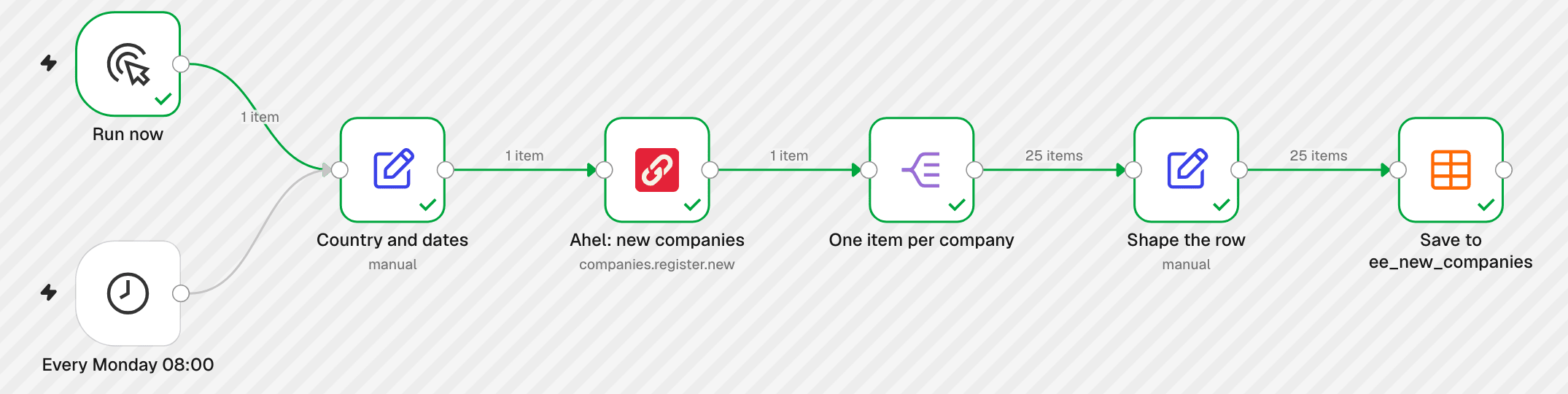
- Run now and Every Monday 08:00. Two triggers on the same path: n8n's manual trigger for testing, and a Schedule Trigger set to weeks, Monday, 8am.
- Country and dates (Edit Fields) sets three fields.
countryisEE,sinceis seven days ago anduntilis today, both as dates from$now. - Ahel: new companies is the only Ahel step. Operation Run Action, action
companies.register.new, arguments as JSON from the three fields. Under Options: Max Results 25, Max Cost per Run 0.01, and the Tagn8n-new-companies, so its runs are easy to find in Activity on ahel.ai. - One item per company (Split Out) splits the field
resultsinto one item per company. - Shape the row (Edit Fields) keeps ten fields and names them for the table. The register's
legal_form_labelbecomeslegal_form,status_labelbecomesstatus, andfound_onrecords the day of the run. - Save to ee_new_companies (Data table) upserts each row into the table
ee_new_companies, found by name, matching onregistry_code.
The arguments of the Ahel step:
{
  "country": "{{ $json.country }}",
  "since": "{{ $json.since }}",
  "until": "{{ $json.until }}"
}
Before the first run, create the table under Overview, Data tables, with ten text columns: registry_code, name, registered_date, legal_form, activity, activity_code, city, status, date_basis and found_on.
What our run returned
On 26 November 2026 the Ahel step answered with one item that carried 25 companies under results. Split Out made 25 items of it, and the table got 25 rows.
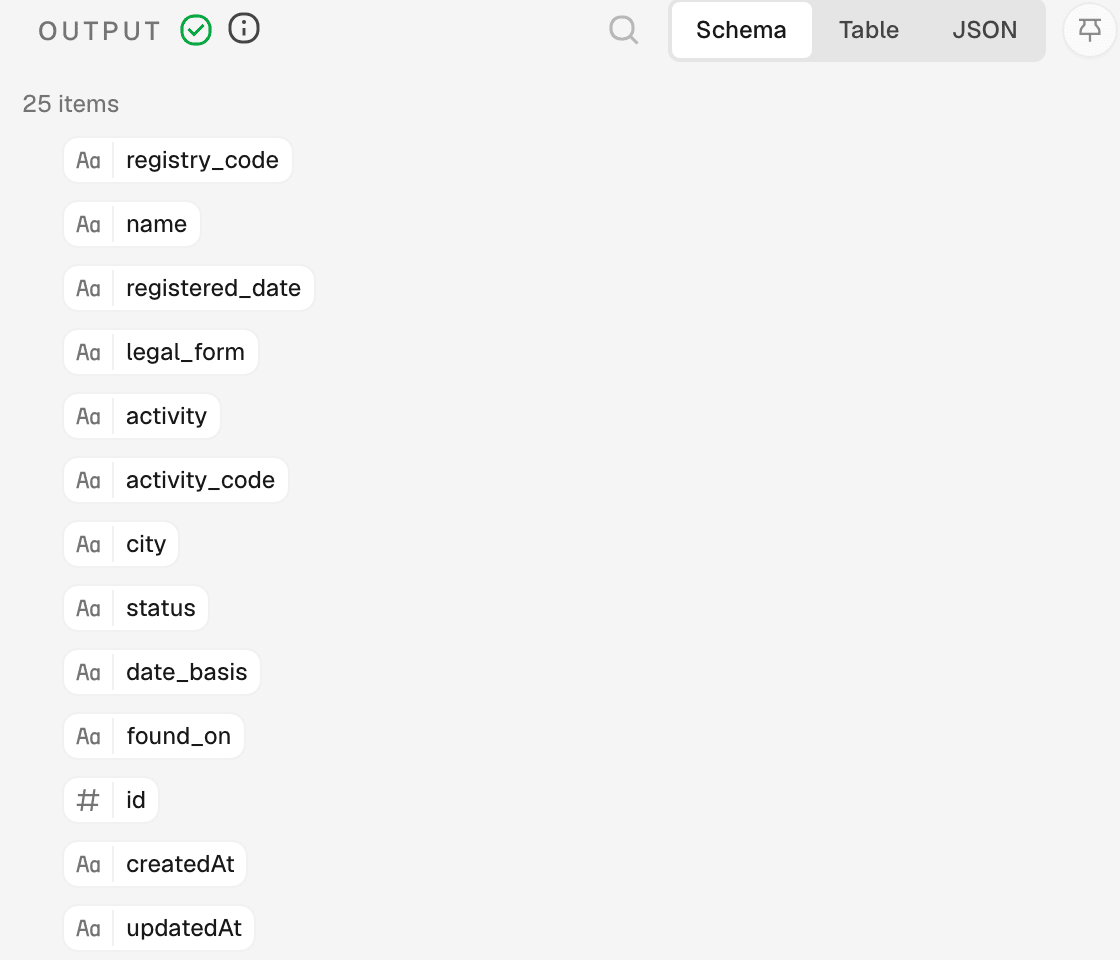
The last three columns, id, createdAt and updatedAt, are added by the data table itself.
date_basis is worth keeping. A company counts as new by the date the register states. When a record has no stated date, it counts only if Ahel saw it appear between two of its daily copies of the register, and the row says the date was observed.
Each answer row carries more than the table keeps: country, first_seen, data_through, date_note, source_url and licence as well. Add any of them to Shape the row and to the table if your tool needs them.
What it cost and how long it took
On our run on 26 November 2026, the Ahel step cost nothing, and the whole automation took 1.8 seconds. The item said cost_usd 0 and charge_status released. companies.register.new reads a register Ahel holds on its own servers.
How to change it
- Another country. Set
countrytoFI,NO,LV,GBorCZ. Other countries are refused, and a refusal is not charged. If one table will hold several countries, add acountrycolumn and match on it as well, since two registers can use the same code. - Another window. Change
$now.minus({days: 7})in Country and dates. A window with no new companies is not charged. - One trade only. Add
queryto the arguments: words in the company name, or in the activity where the register publishes one (Finland and Norway). - Another schedule. Open the Schedule Trigger and pick days, hours or a cron expression. Remember that the window and the schedule go together: a daily run wants a one or two day window.
What to watch out for
- The rows arrive as one item. The node gives one output item per run. The first row's fields sit on the item, and all rows sit under
resultswhen there are two or more. That is why Split Out comes right after the Ahel step. With exactly one company there is noresultsarray, and with none,foundis false. If a quiet week is possible, put an If onfoundbefore the split. - Max Results is a ceiling, and the node does not page. One run returns at most 100 rows, newest first. Our run asked for 25 and got 25, so the week may have held more. Raise Max Results to 100, run more often with a shorter window, or pass the action's
pageargument in a second Ahel step to read further. - 30 requests a minute. Ahel takes 30 requests a minute from a workspace. The node spaces its own requests and waits when it is told to slow down, so one run a week is nowhere near the limit. Several automations in one workspace share it, though.
- Set a Max Cost. This action read Ahel's own register and cost nothing on our run. Keep Max Cost per Run anyway, so a change in price can never surprise you: a run quoted above it is refused, and nothing is held or charged.
The action's inputs, and every other register action, are in the Catalog. Open the Catalog to see them.